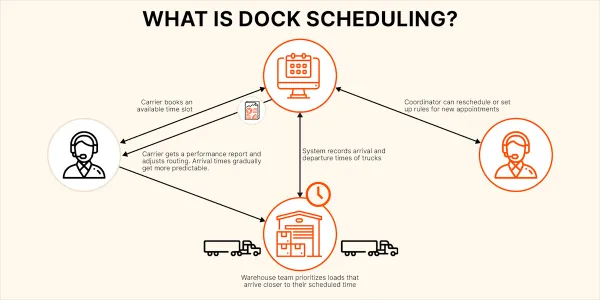
You helped bring a new system into the operation because you could see what it might improve. Now colleagues are looking to you to make it work, while you are still discovering what it can do. That can be exciting and uncomfortable at once. Leading the project means deciding what to commit to, who needs to help, and what the team needs before it depends on the change.
Who decides what?
You’re introducing appointments for regular pallet deliveries first.
A carrier requests 11:00 instead of 10:00. Who can approve the change?
A proposed rule would cancel appointments when required paperwork is missing. Should you turn it on?
Warehouse manager
Choose which deliveries will use bookings first and set the start date. Tell the teams and carriers involved what is changing.
Decide which booking changes supervisors can approve and which need a manager’s decision.
Decide with your colleagues which missing documents should prevent delivery, and who can authorize an exception.
Shift supervisors
Run through a delivery with the receiving crew. Check who finds the booking, records arrival and tells the driver where to go.
Check whether 11:00 fits the crew’s workload and other bookings. Give the carrier an answer and update the booking if the change is approved.
Test the rule against a delivery with missing paperwork. Check whether the load could still be received and what to do if the truck arrives after its appointment is cancelled.
DataDocks support
Demonstrate the booking and arrival steps with the team. Help configure the delivery types and booking hours for those loads.
Show supervisors how to update a booking. Check that their access allows the changes they are responsible for.
Configure the chosen reminder and cancellation conditions. Demonstrate when each would run and which message the booking contact would receive.
Introducing bookings changes the carrier’s instructions and the receiving team’s routine, as well as the software setup.
The decision to accept a new arrival time depends on the work planned for that shift.
Decide which deliveries the facility will accept before asking the software to enforce that rule.
Knowing the operation gives you useful expertise for leading the project. Delivering the change also requires decisions, preparation and support beyond learning to use the system yourself.
Make a commitment your colleagues can plan around
As you discover useful features, the list of possible improvements grows. Give the first stage a clear boundary so colleagues know what you are asking them to prepare for.
For example, introducing appointments for regular pallet deliveries means agreeing which carriers will book, when they will start, and how receiving will use the schedule. It also needs an operating purpose: perhaps giving the receiving lead a dependable view of tomorrow’s deliveries before assigning the crew’s work. That is specific enough to guide preparation and assess later.
Explain what is agreed and which questions still need an answer. If a colleague asks for another feature, explore its value and decide whether it belongs in this stage. Every addition may involve another person to train, instruction to change or decision to make. Keeping that work visible lets you make realistic commitments while retaining the opportunities that made the project exciting.
Bring the right people into each decision
A software setting can carry an operating rule into every delivery. Before enabling it, work through its consequences with the people who own the affected work. A receiving lead can explain what happens on the dock; purchasing or customer service may need to agree what suppliers and carriers will be asked to do.
You can organize that discussion while still learning the system. Take the proposed practice to DataDocks support and ask for a demonstration using a delivery your team recognizes. Ask what staff will see, which messages will be sent and who can make an exception. Use the answers to help colleagues decide whether the practice fits the operation.
This is also how you make supplier help useful. Bring a specific question and the people who need the answer. In research on 13 enterprise-system implementations, Robey, Ross and Boudreau distinguished learning to configure the software from learning the changed work processes. Both need attention, even though different people may help with each.
Prepare people to do the work, then review the improvement
Arrange practice around each person’s responsibilities. The receiving crew needs to find a booking and record the arrival. A supervisor may also need to approve a change and leave information for the next shift. Ask the supplier to help demonstrate the relevant steps, then give staff a chance to carry them out themselves.
Include an awkward delivery in the rehearsal. Working through a request that needs approval shows whether people know who can decide and how to reach them. Resolve those questions before the start date, and agree how the team will raise questions during the first live deliveries. Confirm who will provide help and when they are available.
After launch, spend time with the people doing the work. In his June 2026 account of technology rollouts, Kenco’s chief digital and information officer Pal Narayanan recommends direct conversations with frontline staff during and after implementation to understand how the technology changes their work.
Return to the operating purpose you agreed. Can the receiving lead now plan tomorrow’s work with the information available? What still requires a separate call or search? Booking counts show that people are using the system; those conversations help establish whether the intended improvement is happening and what to adjust next.
For your next project update, explain the first commitment, the decisions awaiting colleagues, and the preparation needed before starting. Give each unresolved item an owner and a next step. You can lead that work while building your own knowledge, with colleagues and the supplier contributing theirs.